
What-If Analysis: Steps, Checklist and a Worked Example
What-If analysis is a team-based hazard identification method in which people who know a process or task ask "what if…?" questions about things that could go wrong, describe the consequences, check whether existing safeguards are adequate, and recommend actions where they are not. It is quick, flexible and qualitative, and works best when combined with a checklist.
What-If is the method most safety professionals have used without naming it. Every pre-job discussion that starts with "what happens if the forklift driver can't see the trailer edge?" is a small What-If session. The difference between that conversation and a proper analysis is structure: a defined scope, the right people, question categories, a written worksheet and tracked actions.
This guide shows how to add that structure. You will get the seven steps, a set of question categories adapted for ordinary workplaces, a complete What-If/Checklist worksheet for a loading dock, and a decision table for choosing between What-If, HAZOP, FMEA and fault tree analysis.
A Loading Dock Nobody Has Analyzed
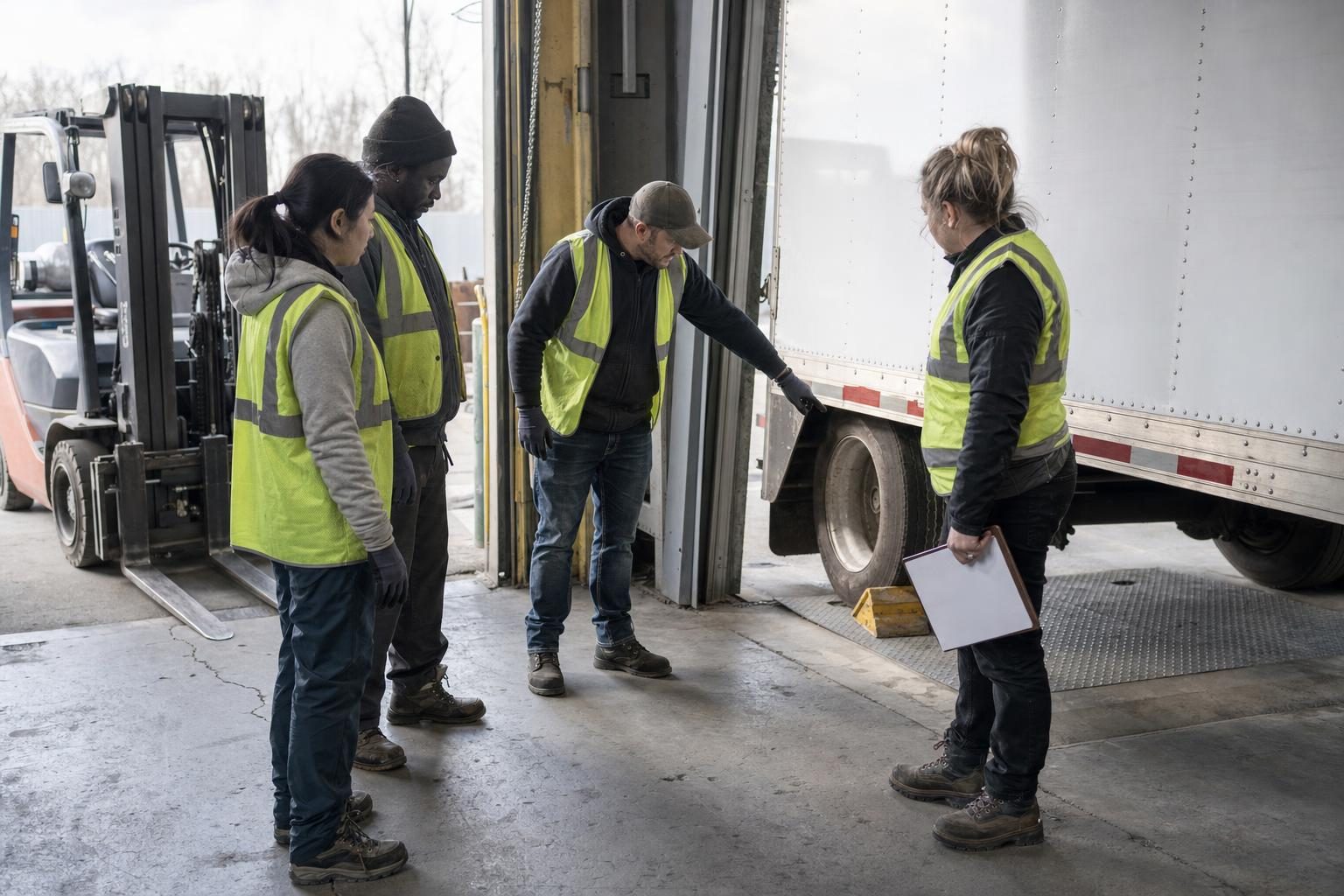
Picture a regional distribution center (a fictional example). It has six dock doors, two forklifts per shift, and trailers from a dozen carriers. The site risk assessment covers the dock in one line: "Forklift operations — trained drivers, speed limit."
Then the operations manager plans a change. Night shifts will start next month, and the dock will run with one supervisor instead of two. Nobody expects a HAZOP for a loading dock, and there is no process flow to break into nodes. But there are obvious questions. What if a trailer pulls away while a forklift is inside it? What if the dock leveler lip doesn't sit on the trailer bed? What if the only supervisor is on another door when it happens?
These are What-If questions. The rest of this guide shows how to turn them into a structured analysis that a team can complete in a single session and an auditor can follow.
What Is What-If Analysis?
What-If analysis is a scenario-based hazard evaluation procedure. The AIChE Center for Chemical Process Safety (CCPS) defines it in its Process Safety Glossary as a brainstorming approach in which a team, including one or more people familiar with the process, asks questions or voices concerns about what could go wrong, what consequences could follow, and whether existing safeguards are adequate.
The method has three common variants:
| Method | How questions are generated | Typical use |
|---|---|---|
| What-If | Free brainstorming by an experienced team | Simple systems, early design, quick reviews of a change |
| Checklist | A prepared list of items to verify | Stable, standard equipment where the hazards are well known |
| What-If/Checklist | Brainstorming structured by categories, then checked against a checklist | Most workplace analyses; the recommended default |
| SWIFT (Structured What-If Technique) | A facilitated What-If/Checklist with defined question categories and a logsheet | Systems and subsystems where HAZOP is too detailed |
CCPS describes the What-If/Checklist variant as a What-If analysis that uses a checklist or list of broad categories of concern to structure the questioning. The UK Ministry of Defence SWIFT guidance explains the logic: SWIFT was first developed for hazard identification in the chemical process industry as an efficient alternative to HAZOP, for situations where HAZOP is not appropriate. HAZOP examines a facility item by item with guidewords, while SWIFT examines complete systems or subsystems.
What-If has a regulatory place too. OSHA's Process Safety Management standard, 29 CFR 1910.119(e)(2), lists What-If, Checklist and What-If/Checklist alongside HAZOP, FMEA and fault tree analysis as acceptable process hazard analysis methodologies. IEC 31010:2019, the international guide to risk assessment techniques, describes SWIFT as a high-level risk identification technique that can be used on its own (IEC TC 56 summary).
When Should You Use What-If Analysis?
Use What-If analysis when you need to identify hazards in a system, task or change that is relatively simple, and when a team with real experience of the work is available. The MoD guidance notes that the technique suits almost any risk assessment, especially those dominated by relatively simple failure scenarios, and is most often used to supplement more structured techniques.
Good fits:
- Changes to operations, such as a new shift pattern, a new layout, new equipment or a new contractor. What-If is a natural first step in a management of change review.
- Non-process workplaces: warehouses, workshops, loading docks, maintenance tasks, laboratories, events.
- Early design, before detailed drawings exist, when HAZOP would have nothing to work on.
- Screening, to decide which parts of a system need a deeper HAZOP or FMEA.
Poor fits:
- Complex or high-hazard processes, such as reactive chemistry or high-pressure systems. The MoD guidance says HAZOP is more systematic and rigorous than SWIFT and can find failures that are not immediately obvious, and recommends it for sections with high-hazard materials, extreme conditions, complex controls or severe potential consequences.
- Questions that need numbers, such as the probability of a top event. What-If is qualitative.
- Teams without operating experience. If nobody in the room has done the job, nobody will ask the right questions.
How to Run a What-If Analysis in 7 Steps
A What-If analysis follows seven practical steps. The sequence below is based on the MoD SWIFT procedure, adapted for workplace safety.
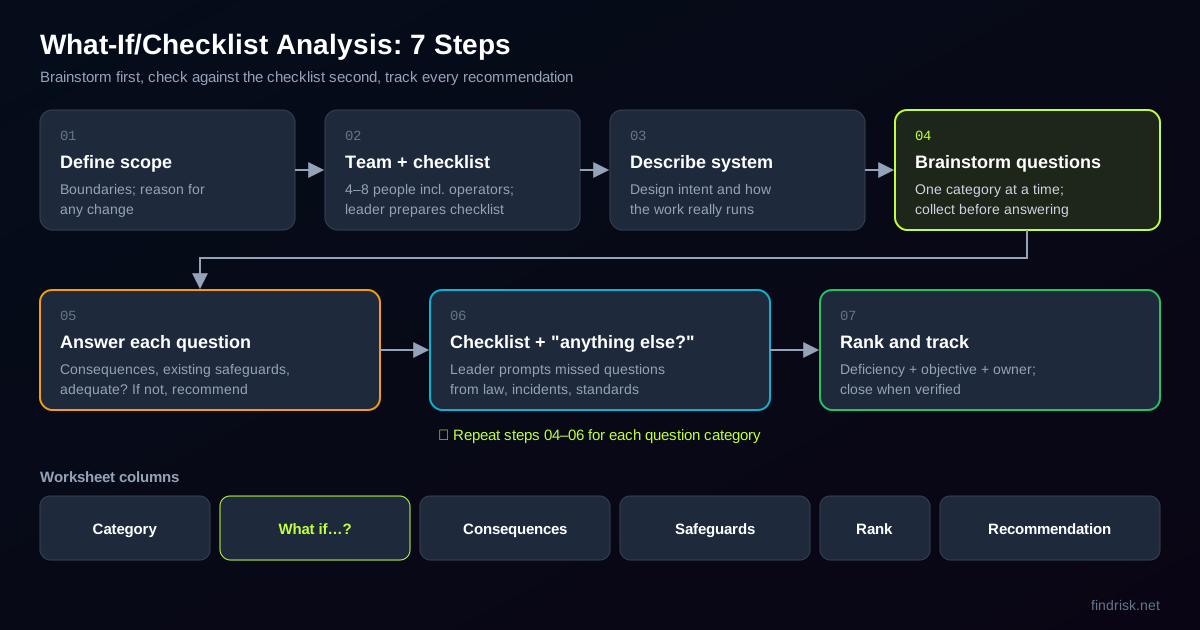
1. Define the scope and boundaries
Name the system, area or task and its boundaries: "dock doors 1 to 6, from trailer arrival at the gate to the trailer leaving the door." If the analysis covers a change, write down why the change is being made, its expected effect on safety and health, what procedures or training it affects and how long it will last. The MoD guidance lists exactly these points for change reviews.
2. Build the team and the checklist
The MoD guidance recommends a team of 4 to 8 people, including a leader and a recorder. OSHA's PSM appendix notes that a team can be as small as two people for simple processes. Include people who do the work on every shift, a supervisor, maintenance, and the safety professional. Before the session, the leader prepares a checklist from legislation, incident reports, standards, existing checklists and task analysis.
3. Describe the system as it really runs
Walk the area or review photos, layouts and procedures. Write the design intent and normal operating conditions at the top of the worksheet. If the team disagrees about how the job is done, record both versions: that disagreement is itself a finding.
4. Brainstorm questions by category
Take one question category at a time (see the next section) and collect as many questions as possible before answering any of them. The MoD guidance warns that interrupting the brainstorm causes questions to be forgotten or never asked. Questions don't have to start with "what if"; "how could…" and "is it possible that…" work just as well.
5. Answer each question
For each question, the team describes how the system would respond, the consequences, and the existing safeguards. If the safeguards are adequate, move on. If not, write a recommendation. The leader can take the most severe questions first, but every question on the list must be discussed.
6. Check against the checklist and ask "anything else?"
Only after brainstorming a category does the leader use the checklist to prompt missed questions. The MoD guidance advises keeping the checklist with the leader rather than handing it out, so it doesn't become a cheat sheet that stops people thinking. At the end, ask the team whether anything else comes to mind.
7. Rank, assign and track recommendations
Rank the recommendations so management sees the most significant issues first, then track them to completion like any corrective action. Write each recommendation as the deficiency plus the objective ("trailer must not be able to move while a forklift is inside"), not as a single prescribed solution.
Question Categories and Checklist Prompts
Question categories are what turn a free brainstorm into a structured What-If. The original SWIFT categories were written for the process industry: material problems, external effects, operating errors and human factors, analytical or sampling errors, equipment or instrument malfunction, process upsets, utility failures, loss of containment, emergency operations and environmental release. The MoD guidance says that for other industries, the team should prioritize the categories by the hazards of the system and work through them in that order.
For a typical workplace, this adapted set works well:
| Category | Example prompts |
|---|---|
| People and human factors | Fatigue, lone working, new or agency staff, language, shortcuts under time pressure |
| Equipment and tools | Failure, wrong equipment, missing guard, defective attachment |
| Vehicles and movement | Unexpected vehicle movement, visibility, pedestrian routes, reversing |
| Maintenance and handover | Work during maintenance, shift handover, contractors, isolation |
| External factors | Weather, lighting, darkness, visitors, third-party drivers |
| Utilities and services | Power loss, lighting failure, communication failure |
| Emergencies | Fire, injury in an isolated area, evacuation, first aid access |
| Health and environment | Noise, fumes, dust, temperature, spills |
Build the checklist for each category from your own sources: legal requirements that apply to the activity, your incident and near-miss records, manufacturers' instructions and existing inspection checklists. For a loading dock, the OSHA powered industrial truck standard (29 CFR 1910.178) gives several ready prompts: brakes set and wheel chocks under the rear wheels while a truck is boarded by a forklift (k)(1), fixed jacks that may be needed for a trailer not coupled to a tractor (k)(3), trailer floors checked for breaks and weakness before they are driven onto (m)(7), and dockboards secured before they are driven over (n)(11).
Worked Example: What-If/Checklist Analysis of a Loading Dock
The example below is fictional but typical. It continues the distribution center from the opening scenario: six dock doors, forklifts loading and unloading trailers, and a planned move to night shifts with one supervisor. The team of six (two forklift drivers, a dock supervisor, a maintenance technician, a carrier liaison and the safety professional) used the categories above and the OSHA 1910.178 prompts.
Scope: dock doors 1–6, from trailer arrival at the door to departure. Design intent: load and unload trailers with counterbalance forklifts without people or vehicles being struck, crushed or falling.
Ranking used: H = credible serious injury or fatality with weak safeguards; M = serious outcome with partial safeguards, or minor outcome with weak safeguards; L = safeguards judged adequate. This simple ranking is our suggestion; use your site's risk matrix if you have one.
| # | Category | What if…? | Consequences | Existing safeguards | Rank | Recommendation |
|---|---|---|---|---|---|---|
| 1 | Vehicles | The trailer pulls away while a forklift is inside it? | Forklift falls between trailer and dock; driver crushed | Drivers told to keep keys; wheel chocks available at each door | H | Trailer must be physically prevented from moving while loading. Evaluate vehicle restraints or a key-control system; until then, chocking checked and signed before each load. |
| 2 | Equipment | The trailer is not coupled to a tractor and the front end tips when a forklift drives in? | Trailer upends; forklift and driver fall | None specific | H | Place a trailer stand under uncoupled trailers before loading; add to the door checklist. |
| 3 | Equipment | The dock leveler lip does not rest fully on the trailer bed? | Forklift wheel drops; load falls; driver jolted or ejected | Leveler serviced annually | M | Visual check of lip seating before the first crossing; add leveler lip damage to the weekly inspection. |
| 4 | Equipment | The trailer floor is rotten or damaged? | Forklift breaks through floor; overturn | None | M | Driver checks trailer floor before entering (1910.178(m)(7)); reject and report damaged trailers. |
| 5 | People | A carrier driver walks into the dock area to check the load? | Pedestrian struck by forklift | Sign at the door | H | Carrier drivers wait in a marked safe zone; dock doors closed to pedestrians during loading. |
| 6 | People | The only night supervisor is busy at another door? | Unsafe loading goes unchallenged; delayed response to an injury | Radio | M | Define which checks drivers sign off themselves; lone-working check-in every hour. |
| 7 | External | Rain or ice makes the leveler and trailer bed slippery? | Forklift skids; load shifts | Anti-slip plate on levelers | M | Weather-dependent check of leveler surface; grit available at each door. |
| 8 | Utilities | Lighting fails inside a trailer at night? | Driver can't see load edge or trailer end; collision, fall | General dock lighting only | M | Provide dock lights that reach inside the trailer; include lighting in the night-shift start check. |
| 9 | Emergencies | A driver is injured inside a trailer on night shift? | Delayed first aid | First aider on day shift only | H | Ensure a trained first aider on every shift; post emergency contact and location at each door. |
| 10 | Health | A diesel truck idles at the door during loading? | Exhaust fumes inside the dock area | Doors open; no rule on idling | L | Engines off at the door, added to carrier rules (low cost; no further analysis needed). |
Three points about this worksheet:
- The change created half the findings. Rows 6, 8 and 9 exist only because of the night shift with one supervisor. That is why What-If works so well as part of a management of change review: it asks how the new situation differs from the old one.
- The checklist caught what the brainstorm missed. The team did not raise row 2 (uncoupled trailer) or row 4 (trailer floor) until the leader read the OSHA 1910.178 prompts. This is the reason to use What-If/Checklist instead of plain What-If.
- Recommendations are objectives, then options. Row 1 states what must be achieved (the trailer cannot move) and lists options. Choosing the strongest option follows the hierarchy of controls: a physical restraint beats a signed checklist.
What-If vs HAZOP vs FMEA vs Fault Tree: Which Method to Choose?
What-If analysis is the fastest and broadest of the common hazard identification methods, but also the least systematic. The table below summarizes how it compares. It is our synthesis of the MoD SWIFT guidance, IEC 31010 and OSHA's PSM appendix.
| Question | What-If / Checklist | HAZOP | FMEA | Fault tree |
|---|---|---|---|---|
| How it finds hazards | Brainstormed questions by category | Guidewords applied to process parameters at each node | Failure modes of each step or component | Works backward from one top event |
| Level of detail | System or subsystem | Item by item, node by node | Step or component | One event, all contributing causes |
| Output | Qualitative list of scenarios and recommendations | Deviations, causes, consequences, safeguards | Ranked failure modes (RPN or action priority) | Logic tree; can be quantified |
| Effort | Low to moderate | High | High | Moderate to high |
| Best for | Changes, simple systems, non-process work, screening | Continuous chemical processes | Machines, lines, changeovers | A specific serious event you must understand in depth |
| Main weakness | Depends on the team asking the right questions | Time-consuming; needs detailed drawings | RPN can hide high-severity rows | Only covers the event you choose |
Many sites combine them. A What-If/Checklist screens the whole system, and the few scenarios with severe consequences get a HAZOP, FMEA or bow-tie analysis. For investigating an event after it happens, use root cause analysis instead.
Common What-If Analysis Mistakes
1. Answering questions as they come up
Discussing each question the moment it is asked kills the brainstorm. The team settles into one topic and the next ten questions are never asked. Collect first, then answer.
2. Running What-If without a checklist
Plain What-If relies entirely on what the team happens to remember. The MoD guidance warns that if the team fails to ask an important question, the analysis is likely to miss important weaknesses. A checklist built from legislation and incident history is the safety net.
3. Handing out the checklist at the start
The opposite mistake. If people read the checklist first, they stop thinking and just tick through it. Keep it with the leader and use it after each category.
4. Leaving operators out
Engineers and managers describe the job as written. Operators describe the job as done. The most useful questions in the loading dock example came from the forklift drivers.
5. Writing vague recommendations
"Improve dock safety" cannot be tracked. Each recommendation should state the deficiency, the objective and an owner, and close only when the action is verified, the way you would close any corrective action.
6. Treating the worksheet as the risk assessment
What-If identifies scenarios; it does not rank risk with numbers. If you need prioritization beyond H/M/L, score the findings with your usual method, such as a risk matrix or Fine-Kinney, and record them in the workplace risk assessment.
How FindRisk Supports Hazard Identification
A What-If session is only as good as what the team knows about the area. With FindRisk, you can photograph the dock doors, levelers and trailer approaches before the session, mark hazards directly on the photos and let the AI analyze them to suggest hazards the team may not have thought of. Those photos give the brainstorm a shared, current picture instead of everyone's memory of the area.
After the session, FindRisk can generate an AI inspection checklist for the area, so the checks that came out of your What-If (chocking, leveler lip, trailer floor, lighting) become a recorded routine. The findings can be scored with Fine-Kinney risk assessment and turned into a professional report in seconds, on iOS and Android.
Frequently Asked Questions
What is the difference between What-If analysis and HAZOP?
HAZOP applies guidewords such as "no", "more" and "less" to process parameters node by node, so it is systematic and detailed. What-If uses brainstormed questions at the level of a whole system or subsystem, so it is faster but depends more on the team's experience. HAZOP suits complex chemical processes; What-If suits simpler systems, changes and non-process work.
Is What-If analysis qualitative or quantitative?
What-If analysis is qualitative. It produces a list of scenarios, consequences, safeguards and recommendations, not probabilities or risk scores. If you need to prioritize the findings, add a risk matrix or a scoring method such as Fine-Kinney. For numbers on a single serious event, fault tree analysis is the usual next step.
Is What-If an acceptable PHA method under OSHA PSM?
Yes. OSHA's Process Safety Management standard, 29 CFR 1910.119(e)(2), lists What-If, Checklist and What-If/Checklist as acceptable process hazard analysis methods, alongside HAZOP, FMEA and fault tree analysis. The employer must use one or more methods appropriate to the hazards of the process, and the analysis must be revalidated at least every five years.
What is the What-If/Checklist method?
What-If/Checklist combines brainstorming with a prepared checklist. The team first brainstorms What-If questions within each category of concern, then the leader uses a checklist built from regulations, standards and incident history to prompt questions that were missed. It combines the creativity of What-If with the completeness of a checklist.
How many people do you need for a What-If analysis?
The UK MoD SWIFT guidance recommends a team of 4 to 8 people, including a leader and a recorder. OSHA's PSM guidance notes that teams for simple processes can be as small as two people. The essential members are people with real operating experience of the system, someone from maintenance and someone with safety expertise.
What are the main disadvantages of What-If analysis?
What-If depends on the experience of the leader and the knowledge of the team; if they fail to ask an important question, the hazard is missed. It is hard to audit for oversights because there is no fixed structure to check against, and it gives qualitative results only. Using categories and a checklist reduces these weaknesses.
Conclusion
What-If analysis is the most accessible hazard identification method: a team, a scope and a set of good questions. Its value comes from structure. Define the boundaries, bring in the people who do the work, brainstorm category by category before answering, and only then use a checklist to catch what the team missed.
Use What-If/Checklist as your default for changes, non-process work and screening, and move to HAZOP, FMEA or fault tree analysis for the few scenarios where the consequences are severe or the system is complex.
Download FindRisk to capture the area with photos before your next What-If session, turn the findings into inspection checklists and produce a professional report in seconds.
Try FindRisk
Ready to modernize your safety workflow?
Conduct AI-powered risk assessments, generate reports instantly, and keep your team safe — anywhere, anytime.